Wednesday, September 14, 2011

to import

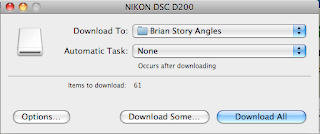
  • Open IMAGE CAPTURE FROM YOUR APPLICATIONS FOLDER
  • Plug in your camera and turn it on

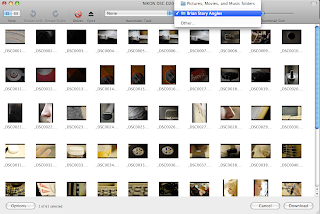
  • Select DOWNLOAD SOME.
  • Choose a new folder to download into EVERY time you download.
  • Next select the pictures you want to download and save them to your NEW folder.
  • and oyu are DONE!

Taking Pics!!!


Today you will shoot pictures!!! We are seeking unique angles, creative compositions, & fantastic images. You will have a partner to share your camera with and each of you will take images of the following:
 
  • Fire Hydrant
  • curb
  • tree/bush
  • trash/litter 
 
Keep the camera on auto today. 

Tuesday, September 13, 2011

The unusual viewpoint of this photo makes for an interesting composition. Image by dollie_mixtures.
Before photographing your subject, take time to think about where you will shoot it from. Our viewpoint has a massive impact on the composition of our photo, and as a result it can greatly affect the message that the shot conveys. Rather than just shooting from eye level, consider photographing from high above, down at ground level, from the side, from the back, from a long way away, from very close up, and so on.

Welcome to Digi Photo


This is going to be a fun semester full of thousands of images, images you will be taking, editing, manipulating, and printing. By the end of this term you should have a SOLID grasp on the compositional techniques involved in photography as well as the a solid foundation in photoshop skills. Buckle up as this is going to be a fast paced adventure through the world of digital photography!

Friday, June 10, 2011

More editing ideas

here is a list of 45 great photo editing techniques if you are in need...

http://vandelaydesign.com/blog/design/photo-editing-tutorials/

Thursday, June 9, 2011

reflection

A one-page reflection is also required for your final. This can be done electronically and does not need to be attached/included in your portfolio. In this paper you need describe what you learned during your project and throughout the term.

  • What new info/techniques/ideas did you learn about your subject, Photoshop, and photography in general.
  • What was easy and difficult about your project/subject?
  • What would you do differently if you could start over again?
  • Finally, how far along do you think you have come as a photographer this semester (think back to our landscape and other intro assignments getting to know composition and the camera)?

Last new Photoshop technique

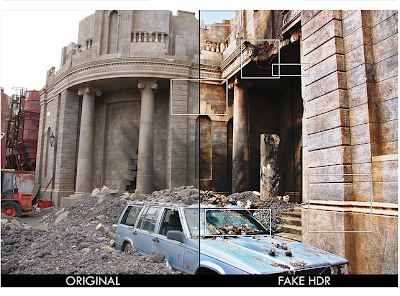
HDR-ish images!
in 8 easy steps:

[ 1 ] We'll call the original layer "ORIGINAL", now duplicate ORIGINAL and place it above that layer. (We'll call this "BLACKWHITE")

[ 2 ] Change the Blending option of BLACKWHITE to "Overlay"

[ 3 ] Go to Image > Adjustements > Desaturate (SHIFT + CTRL + U)

[ 4 ] Now invert BLACKWHITE: Image > Adjustements > Invert (CTRL + I)

[ 5 ] And add a gaussian Blur to it (Filter > Blur > Gaussian Blur) around 40 pixels (This causes the so called 'bleeding' of the edges, tweak the amount to personal likings)

[ 6 ] Now duplicate ORIGINAL and place it above BLACKWHITE, name this layer "LINEAR_LAYER"

[ 7 ] Change the blending type of LINEAR_LAYER to "Linear Light"

[ 8 ] Give LINEAR_LAYER an opacity around 62%. And you're done (For better results, tweak this percentage)