
Friday, March 11, 2011

Thursday, March 10, 2011
ABSTRACT EDITS
You will be turning in 10 edited abstract pics. These needs to be some combination of slow shutter speed pics and standard exposure abstracts. Each pic should be edited to improve its aesthetic qualities and NO images should be obvious or recognizable. Remember, abstract photos are those which take ordinary things and make them extraordinary by focusing in on patterns, lines, textures, colors etc.
You will turn in a folder of your 10 full size pics to the classes folder.
You will turn in a folder of your 10 full size pics to the classes folder.
Tuesday, March 8, 2011
So what are shutter speeds?
What you can do with shutter speed is freeze motion with a fast shutter speed or capture movement with a slow shutter speed. Flowing water looks silky smooth at speeds slower than 1/8th of a second (with a tripod), while you can freeze water in time with fast shutter speeds. The same thing goes for hip hop dancers.
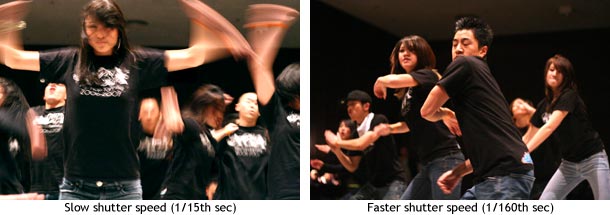
Also, an important side note is that there is a rule for getting sharp images: 1/focal length. So if you have a 50mm lens then you'd need at least 1/50th of a second for your picture to not be blurry, and if you're using a digital SLR then there is a crop value (minus a few exceptions) of 1.5/1.6 so your 50mm lens is a 75~80mm lens, which means that you need a shutter speed of at least 1/80th of a second to get a sharp image.
Summary: Fast shutter speed = freeze action. Slow shutter speed (w/ tripod) = silky flowing water.
Also, an important side note is that there is a rule for getting sharp images: 1/focal length. So if you have a 50mm lens then you'd need at least 1/50th of a second for your picture to not be blurry, and if you're using a digital SLR then there is a crop value (minus a few exceptions) of 1.5/1.6 so your 50mm lens is a 75~80mm lens, which means that you need a shutter speed of at least 1/80th of a second to get a sharp image.
Summary: Fast shutter speed = freeze action. Slow shutter speed (w/ tripod) = silky flowing water.
Abstract manipulation with the camera
by slowing down the shutter on your camera (allowing things to move while the camera is taking the image) can result in some amazing images... below are some links, full of info and examples. Toady we will be shooting more abstract images, but adding slow shutter speeds into the mix to aid in improving our shooting adventure.

http://digital-photography-school.com/shutter-speed
http://www.ephotozine.com/article/Camera-Shutter-Speeds-explained-4794
http://www.takegreatpictures.com/slow_shutter_speeds.fci
http://coolandspicy.net/2009/04/some-slow-shutter-fun/

http://www.picpot.co.uk/tips-for-abstract-photography-5.html
http://4pphotoblog.blogspot.com/2008/05/shutter-painting.html
http://digital-photography-school.com/shutter-speed
http://www.ephotozine.com/article/Camera-Shutter-Speeds-explained-4794
http://www.takegreatpictures.com/slow_shutter_speeds.fci
http://coolandspicy.net/2009/04/some-slow-shutter-fun/
http://www.picpot.co.uk/tips-for-abstract-photography-5.html
http://4pphotoblog.blogspot.com/2008/05/shutter-painting.html
Monday, March 7, 2011
notes on PS
SELECTIVE FOCUS -
- open your image
- select what you want to stay in focus
- select > modify > feather
- select > inverse
- apple "J"
- filter > blur > G.Blur > 4 - 15
- ***optional > lower the layer opacity
VIGNETTE -
- select what you want to keep properly exposed.
- select > modify > feather
- select > inverse
- press D
- make a new layer
- fill our selection with black
- select > deselct
- filter > blur > G.Blue = 60 - 150
- lower the opacity
- open your image
- select what you want to stay in focus
- select > modify > feather
- select > inverse
- apple "J"
- filter > blur > G.Blur > 4 - 15
- ***optional > lower the layer opacity
VIGNETTE -
- select what you want to keep properly exposed.
- select > modify > feather
- select > inverse
- press D
- make a new layer
- fill our selection with black
- select > deselct
- filter > blur > G.Blue = 60 - 150
- lower the opacity
Editing Abstracts
Tools to edit your abstracts:
- Vignette - learn today
- Selective Focus - learn today
- Contrast
- Saturation
- Photo Filters
- Fill Adjustment Layers
Thursday, March 3, 2011

Subscribe to:
Posts (Atom)